

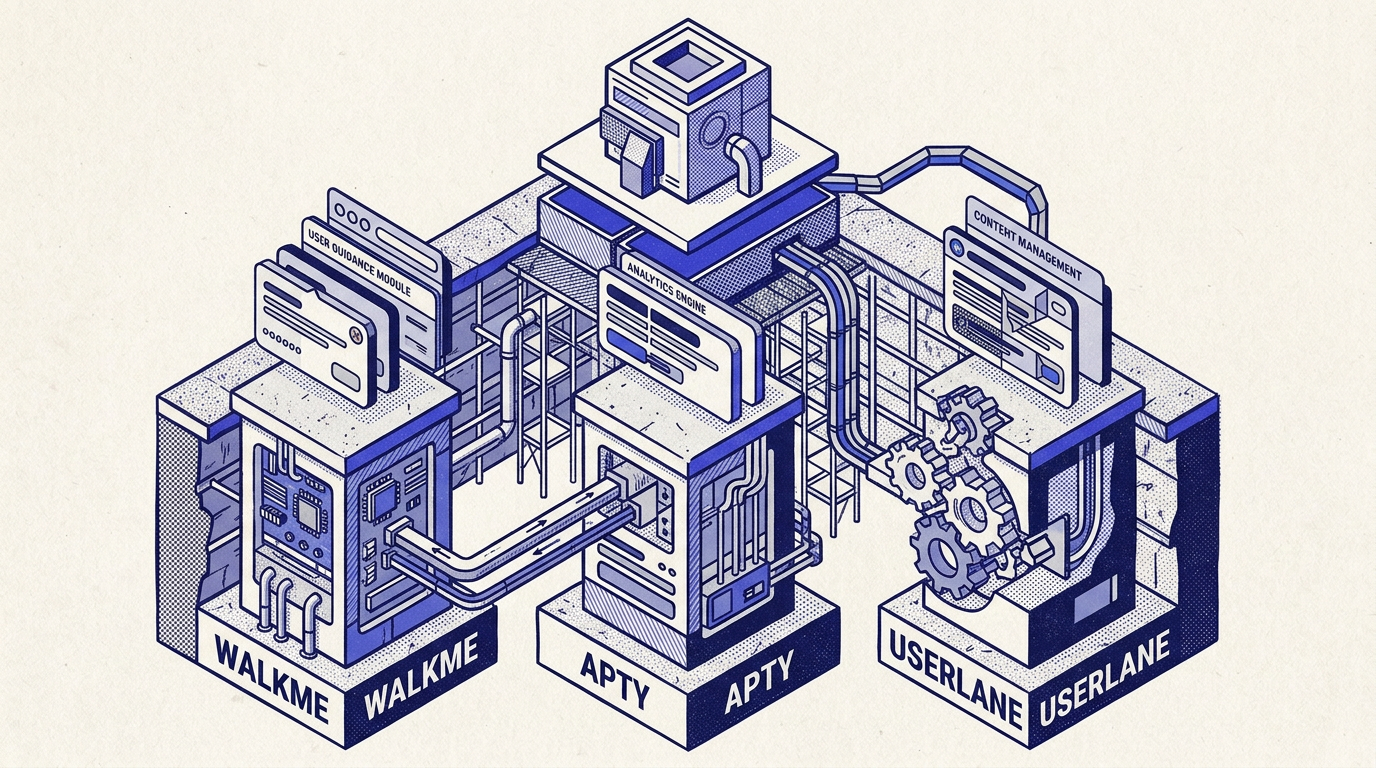
Enterprise software adoption is undergoing its biggest structural shift in fifteen years.
For over a decade, CIOs and digital transformation leaders relied on a familiar playbook to drive employee adoption across sprawling stacks like Salesforce, Workday, ServiceNow, and SAP: deploy a Digital Adoption Platform (DAP), record step-by-step click sequences across target interfaces, and push interactive tooltips onto user screens.
Then the ground shifted. In September 2024, SAP completed its $1.5 billion acquisition of WalkMe, accelerating the consolidation of the legacy category while leaving enterprise buyers wary of ecosystem lock-in. Simultaneously, mid-market contenders like Apty and European players like Userlane stepped into the spotlight, promising faster deployment, tighter data validation, or sovereign GDPR compliance.
Yet behind product demos and vendor scorecards lies an uncomfortable reality: first-generation DAP architectures are buckling under the weight of modern web engineering.
This guide delivers an unvarnished, engineering-level teardown of WalkMe, Apty, and Userlane. We analyze how their browser extensions actually interact with the DOM, evaluate their real total cost of ownership (TCO), and uncover why traditional selector-based guidance turns into an endless maintenance sinkhole for IT teams.
The Enterprise Digital Adoption Platform Landscape in 2026
To understand the friction enterprise teams experience today, we must first examine how legacy DAPs function under the hood.
Regardless of marketing terminology—whether vendors call them "smart walkthroughs", "interactive lanes", or "contextual workflows"—every first-generation DAP operates on the same core mechanism:
- Client-Side Runtime Injection: On third-party enterprise tools where IT teams do not own the source code (such as Salesforce Lightning, Workday, or Coupa), the DAP is injected into the employee’s browser via a mandatory Chrome or Edge extension deployed through enterprise endpoint management systems (MDM, Microsoft Intune, or Group Policy).
- DOM Element Mapping: An administrator or instructional designer opens a recording extension (WalkMe Editor, Apty Studio, or Userlane Editor) and clicks on interface elements. The tool captures a fingerprint of that element using CSS class selectors, ID attributes, and XPath hierarchies.
- Continuous DOM Surveillance: At runtime, the injected client executes JavaScript observers to monitor every screen transition, waiting for the target selector to mount in the Document Object Model (DOM) before tethering an absolute-positioned floating tooltip or modal to it.
When business applications were static, server-rendered multi-page architectures, this approach was sufficient. In today’s enterprise environment of reactive Single-Page Applications (SPAs), dynamic DOM mutations, and encapsulated Web Components, this mechanical approach breaks down.
Why Is Apty Claimed as the Best Digital Adoption Solution?
If you search enterprise procurement channels, you frequently encounter the phrase: "why Apty is the best digital adoption solution". This phrasing originates from Apty’s aggressive positioning against legacy giants, notably showcased in their executive materials and comparative analysis on Why Apty | Enterprise ROI.
Does Apty’s technical architecture validate this claim?
The Core Differentiator: Real-Time Data Validation
Unlike WalkMe or Userlane—which were primarily engineered to display navigational tooltips—Apty's fundamental value proposition centers on business process compliance and data quality.
According to Apty's Data Quality Architecture, the platform allows system administrators to enforce field-level validation rules directly inside the employee's browser before a form is submitted to the backend ERP or CRM.
For example, on a Salesforce opportunity or SAP procurement order:
- Apty evaluates regex formats (e.g., tax IDs, postal codes, international phone formats).
- It enforces cross-field business logic (e.g., if Discount > 15%, the VP Approval Code input becomes mandatory before submission).
- It blocks form submission if required governance fields are left blank, preventing bad data from contaminating corporate databases.
For enterprise operations leaders grappling with messy CRM hygiene, this capability is genuinely useful.
The Technical Blind Spot: Builder Limitations and Client-Side Brittle Logic
Despite this strength, Apty reveals substantial compromises when evaluated as a comprehensive adoption platform:
- Subpar Authoring Capabilities: In the comprehensive 2026 DAP benchmark conducted by Digital Adoption's WalkMe vs. Apty Audit—evaluating 33 platform criteria—Apty achieved an overall score of 61/100, compared to 96/100 for WalkMe. The starkest gap appeared in the Builder capability (50/100 for Apty vs. 96/100 for WalkMe), reflecting minimal workflow automation depth and a restricted rule engine.
-
DOM-Level Form Hijacking: Implementing client-side validation via a browser extension requires listening to native
blur,change, andsubmitevents. In complex, reactive enterprise frameworks (like Salesforce Lightning Web Components or custom React SPAs), form state is managed via synthetic event delegates and virtual DOM reconciliation. Injected validation scripts frequently collide with native framework state cycles, leading to false validation errors or bypassed rules. - Extension Dependency: Like all legacy players, running Apty on corporate tools mandates the rollout of the SYF Apty Client Chrome Extension, placing ongoing maintenance and version auditing onto IT desktop teams.
WalkMe Under SAP: Enterprise Power at an Unforgiving TCO
WalkMe remains the undisputed technical heavyweight in the enterprise DAP space. Founded in 2011 and backed by hundreds of enterprise patents, it provides the most comprehensive feature matrix available: multi-application workflows, branching conditional logic, desktop agent integrations, and conversational bots.
However, deploying WalkMe involves technical and operational trade-offs that IT leaders must calculate upfront.
The Mandatory Browser Extension Footprint
A common misconception among business buyers is that WalkMe can be activated across SaaS tools with a simple configuration switch.
On enterprise platforms like Salesforce Lightning, WalkMe cannot run via a native application snippet. As explicitly documented in WalkMe Help Center — Install WalkMe for Salesforce Lightning, the platform mandates deploying an enterprise browser extension across all internal users via mass IT installation.
The Real Cost: Vendr Transactional Benchmarks
WalkMe maintains strict quote-based pricing, keeping rate cards hidden behind sales conversations. However, anonymized contract data published by SaaS procurement platform Vendr reveals the real spending baseline:
According to verified contract data compiled in Userpilot's WalkMe Pricing Analysis:
- Median Annual Contract: $39,000/year across 45 reported deals (ranging between $14,400 and $197,118 for mid-sized tiers).
- Enterprise Deployments: Organizations rolling out WalkMe to 500–1,500 employees routinely pay between $150,000 and $400,000/year, with multi-app global enterprise agreements easily surpassing $800,000/year.
-
À La Carte Add-On Fees:
- WalkMe Insights (advanced telemetry and user funnel analytics): +$10,000 to +$50,000/year.
- ActionBot (conversational task automation): +$15,000 to +$40,000/year.
- Professional implementation services: frequently billed at $50,000 to $150,000 for initial setup.
- Annual contractual escalators: standard clauses enforce +5% to +10% price increases year-over-year.
The Maintenance Trap and the "DeepUI" Patent
Why does maintaining WalkMe cost so much?
Because user interfaces update constantly. In an effort to stop guides from breaking every time an enterprise vendor pushes an update, WalkMe engineered a proprietary, patented heuristic algorithm called DeepUI.
In WalkMe's DeepUI Technical Documentation, WalkMe openly explains the root problem:
"Business applications are constantly changing as software vendors add new features, improve user experience, and fix bugs. These changes can break on-screen guidance and disrupt user behavior analytics... WalkMe DeepUI generates a detailed description of the element and downloads descriptions of the element and its surrounding DOM context to relocate it at runtime."
Even with DeepUI, the cognitive and operational burden remains heavy. Authoring reliable WalkMe workflows requires certified specialists ("WalkMe Builders"). If your organization lacks an internal full-time employee (FTE) dedicated to monitoring and re-mapping WalkMe guides, content slowly deteriorates into broken or misplaced tooltips.
Is Userlane the Sovereign Alternative European IT Teams Need?
For European organizations navigating stringent compliance mandates, Munich-based Userlane has emerged as a prominent alternative to US-headquartered vendors.
The European Advantage: Clean GDPR and Sovereign Hosting
Userlane’s primary differentiator is its European DNA:
- Sovereign Cloud Infrastructure: Hosted exclusively in the European Union (AWS Frankfurt), avoiding the legal exposure of the US Cloud Act and FISA 702 data transfers that concern European DPOs.
- Streamlined Implementation: Unlike WalkMe’s intimidating configuration curve, Userlane is designed for rapid onboarding. Non-technical HR and operations managers can typically record basic guides within hours.
The Architectural Limitation: The Rigidity of Linear "Lanes"
While Userlane satisfies privacy checklists, its underlying architecture encounters friction on complex enterprise workflows:
- Rigid Sequential Flows: Userlane guides users through structured step-by-step tracks termed "Lanes". As highlighted in Userguiding's Comparative Analysis of Userlane, these lanes assume a strictly linear progression. If an end-user deviates—such as opening a collateral sub-tab, handling an asynchronous validation alert, or navigating on a smaller viewport—the Lane frequently freezes, waiting for a click on a button that is no longer visible.
- Basic Analytics & Visual Limitations: Userlane provides limited native behavioral analytics. Teams seeking deep drop-off funnels, cohort segmentation, or user friction telemetry must export data into third-party tools like Google Analytics or Zendesk.
- Extension Overhead: Like its peers, delivering guidance on internal third-party apps requires installing the Userlane Chrome Web Store Extension.
The Shared Architectural Traps of First-Generation DAPs
When evaluating WalkMe, Apty, and Userlane, IT leaders often focus on feature matrices and pricing negotiations. However, the most critical risks stem from their shared 2010s technical foundation.
Here are the three architectural bottlenecks inherent to any DOM-scraping DAP:
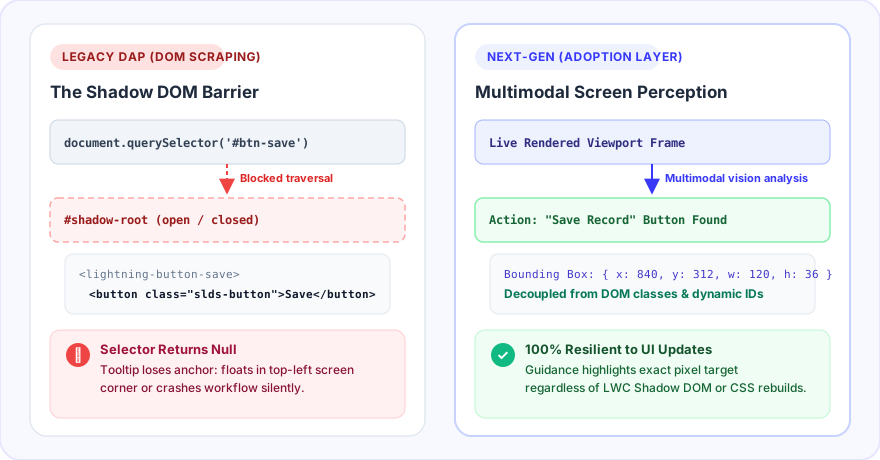
1. The Shadow DOM Impasse (Salesforce LWC)
Modern web interfaces are no longer built with flat HTML. Platforms like Salesforce Lightning are powered by Web Components and the Shadow DOM, as documented in the W3C Shadow DOM Specifications on MDN and the Salesforce Lightning Web Components Architecture.
The Shadow DOM introduces strict encapsulation boundaries (#shadow-root). Standard DOM query APIs like document.querySelector() or global XPath expressions cannot traverse into a shadow tree from the outside document.
To anchor tooltips inside Lightning Web Components, legacy DAPs must execute brittle recursive DOM-piercing algorithms. When components leverage closed shadow roots (mode: 'closed') or when Salesforce activates strict Lightning Web Security (LWS) sandboxing, legacy extensions lose access. The result: tooltips detach from target buttons, float errantly in screen corners, or fail to render entirely.
2. Browser Performance Degradation and MutationObserver Exhaustion
How does a DAP extension know an element has appeared on a dynamic single-page application?
It registers a global MutationObserver on the document.body to listen for DOM tree modifications.
On data-intensive enterprise interfaces—such as Salesforce Kanban boards, ServiceNow incident consoles, or SAP analytical tables—every user scroll, filter toggle, or background poll fires thousands of DOM mutations per minute.
When a DAP extension inspects every mutation against its library of step selectors, it monopolizes the browser’s single JavaScript execution thread. Employees experience this directly as:
- Noticeable keystroke latency (input lag) when typing in form fields.
- Memory leaks during extended working sessions without hard page reloads.
- Elevated CPU usage and battery drain on enterprise laptops.
3. The Seasonal Release Maintenance Tax
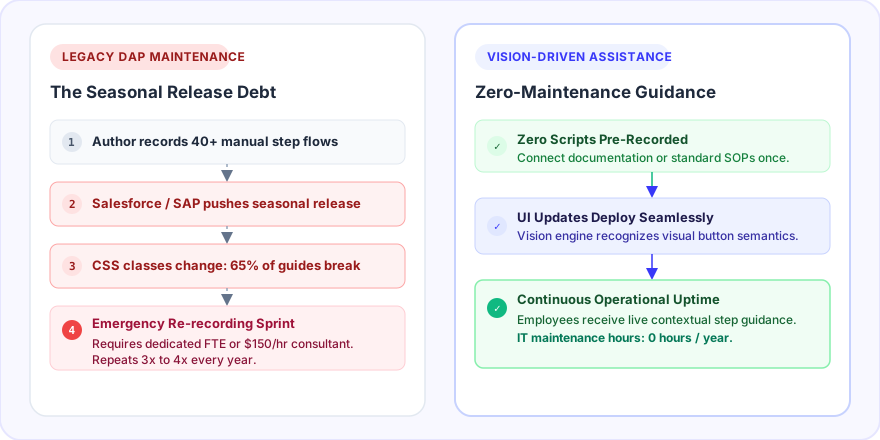
Enterprise software vendors deploy updates on predictable schedules: Salesforce pushes three major seasonal releases each year (Spring, Summer, Winter), while Workday and ServiceNow deploy bi-annual overhauls.
Each release alters CSS class nomenclatures, refactors layout hierarchies, and regenerates dynamic element IDs. For an enterprise maintaining 50 active walkthroughs across their CRM and ERP, every major vendor release triggers a wave of broken guides. IT and business operations teams find themselves trapped in a permanent cycle of manual re-recording—a hidden labor tax that rarely appears in initial vendor ROI projections.
How Do WalkMe, Apty, and Userlane Compare Side-by-Side?
The following matrix synthesizes the technical, operational, and financial dimensions across all three platforms, alongside the modern vision-driven paradigm:
| Evaluation Dimension | WalkMe (SAP) | Apty | Userlane | Next-Gen AI Adoption (AdoptionLayer) |
|---|---|---|---|---|
| Core Value Proposition | Comprehensive enterprise adoption & process automation suite | Real-time form validation and business process compliance | Simple, accessible employee guidance for European mid-market | Autonomous, on-demand contextual guidance via real-time screen understanding |
| Builder Benchmark Score (Digital Adoption 2026) | 96 / 100 | 50 / 100 | Unranked (~65) | No manual recording (zero brittle step scripts) |
| Underlying Architecture | Enterprise Chrome extension + DeepUI heuristic engine | Enterprise Chrome extension + DOM-level regex interceptors | Enterprise Chrome extension + sequential "Lanes" | Multimodal live screen reading (Computer Vision + DOM semantics) |
| Vulnerability to UI Redesigns & LWC | Moderate (mitigated by DeepUI, but still bound to DOM trees) | High (validation rules decouple if input DOM attributes shift) | High (linear flows break if element positions change) | Zero (interprets the live visual interface like a human expert) |
| Data Sovereignty & Privacy | US / EU multi-region (SAP BTP cloud infrastructure) | US / India hosting infrastructure | 100% Germany (AWS Frankfurt), native GDPR | European hosting, strict client-side PII redaction by design |
| Pricing Reality | Median $39,000/yr; enterprise tiers $150k–$400k+ + pro services | Custom quote (mid-market tier, typically $15k–$45k/year) | Custom quote (tiered, typically $10k–$30k/year) | Transparent, self-serve or usage-based pricing with zero hidden fees |
| Human Maintenance Burden | Very High (mandates certified WalkMe Builders or agency retainers) | High (continuous maintenance of client validation rules) | Moderate (constant updates of linear Lane sequences) | Autonomous (adapts dynamically to UI changes in real time) |
| User Interaction Model | Intrusive push (popups, launchers, banners) | Intercept push (blocking validation modals) | Structured push (guided lane overlays) | Contextual pull (triggered only when the user requests guidance or hesitates) |
The Shift Toward Vision-Driven Contextual Guidance
The fundamental limitation of first-generation DAPs is not their feature set; it is their architectural coupling to the Document Object Model.
By relying on CSS selectors, XPath strings, and brittle DOM hooks, platforms like WalkMe, Apty, and Userlane built elaborate scaffolding over a foundation that inherently moves. Every time an underlying enterprise application updates, the scaffolding cracks.
This is why modern teams are shifting toward a fundamentally different model: the multimodal adoption layer.
Instead of forcing teams to manually record click-by-click scripts:
-
Live Visual Understanding: An intelligent adoption engine reads the application interface dynamically using visual comprehension combined with contextual DOM semantics. It interprets what is on the screen the same way a human trainer would—identifying fields, action buttons, and error states regardless of whether a CSS class name changed from
.slds-input_v1to.slds-input_v2. - Pull-Based Assistance: Rather than bombarding employees with multi-step popups they immediately dismiss, next-generation guidance remains dormant until the user actually encounters a roadblock, asks a question, or hesitates on an empty dashboard.
- Zero Maintenance Overhead: Because guidance is synthesized dynamically based on real-time interface comprehension and corporate knowledge bases, seasonal software updates require zero re-recording hours from IT teams.
If your organization is evaluating enterprise digital adoption platforms in 2026, look beyond the slick vendor demonstration. Ask how many hours your team will spend fixing broken selectors, inspect the extension's memory footprint on your corporate laptops, and demand transparency on real multi-year maintenance costs.
The future of software adoption is not recording yesterday’s clicks—it is empowering users with autonomous, intelligent guidance that adapts as fast as modern software evolves.